Kristina Schulz

Updated last week

Data recovery tool for drive partitions

TestDisk is a free utility program from developer CGSecurity, and is a data recovery tool specifically meant to help users recover data or access to faulty or corrupted partitions on their storage drive. It works with a wide variety of device types, including both internal and external storage solutions.

Faulty drives

In a nutshell, TestDisk helps you recover data from hard drives with corrupted or faulty partitions in them that you are no longer able to access, either due to accidental deletion or even from virus infections. It works with a wide range of storage types and supports various file system formats, including ext, FAT, NTFS, and APFS.

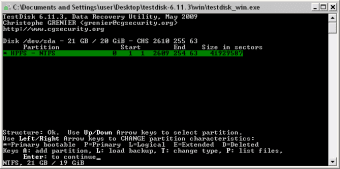
What’s more, this tool can also be used to repair boot drives and make them bootable again, which is handy if you work with installers, operating systems, or live tools. Now, the only thing to be aware of before proceeding is that this utility doesn’t have a graphical user interface and is completed operation using a command terminal, which not many users are familiar with or are used to.

In practical usage

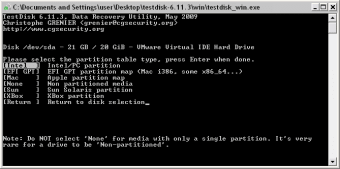
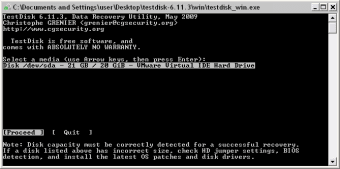
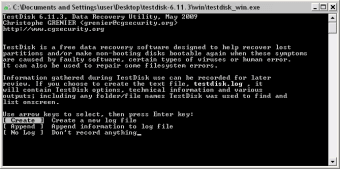
Despite running entirely from the command line, using TestDisk is relatively easy once you learn its basic navigation system. To begin, select the Create option and choose the specific drive you want to be analyzed from the list of detected storage devices. After that, select the partition type that corresponds to your system, whether Windows, Mac, or Linux. From there, just wait for the scan to finish.

Check the result list for the lost or corrupted partition and select it for recovery. This applies to a data partition or a boot partition. Now, if it's your files you want to recover, proceed to the Advanced Menu, select your drive again, and pick the Undelete option. It will list all files inside, so pick the one you want to get back.

Save partitions and boot drives

To conclude, if you find yourself in a situation wherein you can’t access your drive partition or bootable drive, TestDisk is a handy tool that can help you out. It supports various storage types and different file system formats. If you can work with its purely terminal-based interface, give it a try and see for yourself.


Kristina Schulz

Kristina has professional experience in Europe, the United States, and Asia, specializing in communication and languages. She values adaptability in multicultural settings and brings this perspective to her writing. Her content reflects clarity, cross-cultural awareness, and practical expertise in connecting ideas through language.

  • Pros

    • Fast and lightweight
    • Support for various storage types
    • Work with multiple file system formats
  • Cons

    • No graphical user interface
 0/6

App specs

Also available in other platforms

Program available in other languages


User reviews about TestDisk

3.8

2 reviews

Add review

Main reviews for you

  • Anonymous user

    Outstanding low level disk program. In addition, easy to use.

  • Anonymous user

    Brilliant! Works amazingly well!. This Terminal-based utility may seem a little off-putting for some, but the instructions are very straightforward and it does a fantastic job...free!It managed to retrieve not only the photos from my formatted CF card, but also even a load from a long time ago! A very capable utility.Well worth a donation and could well still be cheaper than buying a GUI-driven program.

More

You may also like

Alternatives to TestDisk

Explore Apps

Latest articles

Laws concerning the use of this software vary from country to country. We do not encourage or condone the use of this program if it is in violation of these laws.
Softonic

Is TestDisk safe?

100/100

Score result: Clean

This file passed a comprehensive security scan using VirusTotal technology. It is safe to download.

  • Virus free
  • Spyware free
  • Malware free
  • Verified by Security Partners

    VirusTotal logo

Scan Info

Last scan
Monday, November 20, 2023
Scan provider
VirusTotal · Full report

File Integrity

File
testdisk-7.1.win.zip
SHA256
1231ccfd46815e324f3c541b1e4a0a569a0a16b5c7d320c8c049c36595785224
SHA1
2f2131deee5152cbc08e54be440386ad0f3cf705

Softonic security commitment

TestDisk has been thoroughly scanned by our advanced security systems and verified by industry-leading partners. This file comes from the official developer and has passed all our security checks, showing no signs of viruses, malware, or spyware. For more information, visit our Security and Trust Center